Understand the request
Normalize and parse application-layer fields so policies can reason about paths, parameters, bodies, methods, sessions, and client context.
 WAFWikiIndependent WAF intelligence
WAF fundamentals
A Web Application Firewall protects web applications and APIs by inspecting application-layer traffic before it reaches the origin. A useful WAF program combines the right traffic placement, understandable policies, representative clean-traffic testing, event operations, and a tested rollback path.
Quick answer
A WAF sits on the request path to a website or API, parses HTTP context such as the host, URI, headers, parameters, cookies, and body, then applies rules or behavioral signals. It can allow, log, challenge, rate-limit, or block a request. It complements secure development, identity controls, network firewalls, and monitoring; it does not replace them.
Definition and scope
Traditional packet filtering can decide whether an address, protocol, or port is allowed. A WAF works higher in the stack. It evaluates the structure and meaning of HTTP or HTTPS traffic, including the requested route, method, headers, cookies, parameters, body format, response context, and application-specific exceptions available to the product.
The term WAF covers several product shapes. It can be a managed cloud service, a global edge control, a virtual or physical appliance, a reverse-proxy service, an ingress integration, or a library embedded into a gateway. The shared purpose is application-aware inspection and policy enforcement on web traffic.
Normalize and parse application-layer fields so policies can reason about paths, parameters, bodies, methods, sessions, and client context.
Apply managed rules, custom rules, allowlists, rate controls, anomaly scores, reputation, or behavioral signals supported by the chosen platform.
Allow, log, count, challenge, rate-limit, or block while retaining enough evidence for tuning, incident response, and rollback.
Request lifecycle
The exact pipeline differs by product, but a defensible evaluation should be able to trace a request through these stages. Encryption must terminate where the WAF can inspect the intended HTTP context, and the origin path must not silently bypass the control.
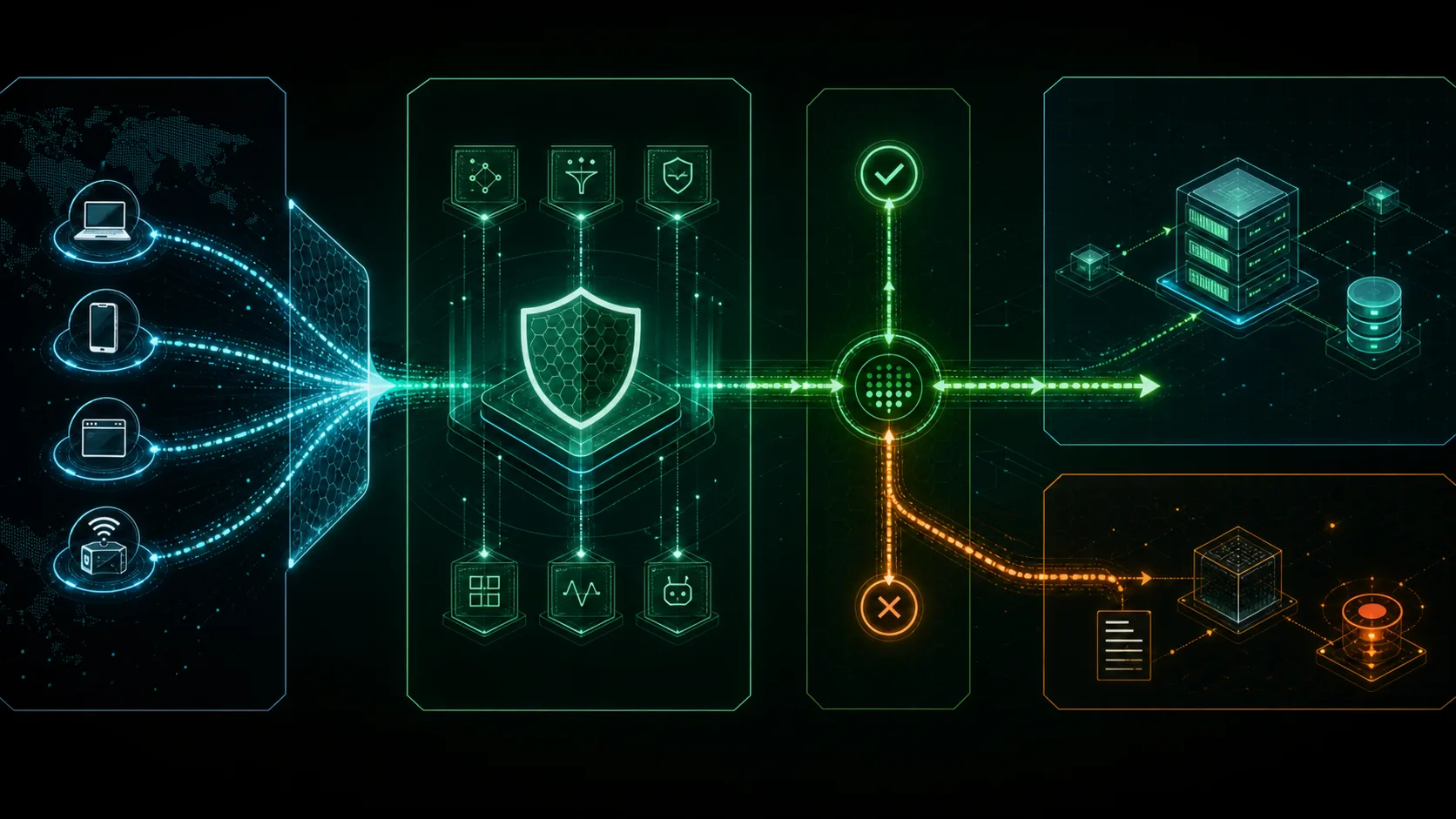
The WAF receives traffic from an edge, proxy, load balancer, ingress, or gateway path and interprets the HTTP message according to its parser and configured limits.
Managed signatures, custom expressions, anomaly scores, rate conditions, reputation, and behavioral signals are evaluated in a product-specific order.
A matching request may be logged, counted, challenged, delayed, rate-limited, or blocked. Non-matching traffic is forwarded to the application through the configured origin path.
Useful events identify the request field, rule or signal, action, application route, upstream result, and enough client context to explain the decision without exposing unnecessary sensitive data.
Architecture choices
Deployment shape determines who owns DNS, TLS, scaling, upgrades, logs, failure modes, and emergency rollback. Products with similar rule features can still create very different operating models.
Traffic is inspected on a provider edge or cloud delivery path. This can simplify global scale and managed rules, but DNS, routing, plan limits, logging, support, and origin-bypass controls become part of the decision.
A WAF policy attaches to a supported load balancer, CDN, API, or application delivery resource. It fits native workloads well but inherits that cloud's resource scopes, regions, logging, and pricing model.
The team runs the inspection layer near the origin or network boundary. This provides direct control and can support private environments, while making capacity, patching, high availability, and rule operations local responsibilities.
Inspection runs in Kubernetes ingress, an API gateway, a service proxy, or application delivery code. It can align policy closely with engineering workflows but requires careful connector, parser, upgrade, and ownership validation.
Protection scope
Coverage depends on the product, ruleset, inspected fields, body limits, protocol support, and tuning. A feature name is not evidence that a specific workload is protected.
Security boundaries
A WAF reduces part of the application attack surface. It cannot prove that the application is secure, and it should not become a reason to postpone code fixes, access control, asset inventory, or incident response.
Business-logic abuse, broken authorization, insecure workflows, exposed secrets, and vulnerable dependencies often require code, architecture, identity, or process changes rather than a request-filter rule.
A WAF is not a host firewall, endpoint control, patch-management system, segmentation policy, or general replacement for network firewalls and DDoS controls across every layer.
Some modern platforms add API discovery and schema enforcement, but a basic WAF does not automatically know every API, object-level authorization rule, sensitive data flow, or abandoned endpoint.
Broad rules can block legitimate traffic, while narrow rules can miss attacks. Parser differences, encodings, exclusions, rule order, and application changes require ongoing testing and review.
Control boundaries
These controls can coexist. The practical question is which layer has the context and ownership required for each decision, not which acronym replaces every other control.
| Control | Primary scope | Typical position | Key difference |
|---|---|---|---|
| Web Application Firewall | HTTP websites and APIs | Edge, reverse proxy, ingress, gateway, or service attachment | Understands application-layer request context and applies web security policy. |
| Network firewall or NGFW | Networks, hosts, services, protocols, and connections | Network perimeter, segment boundary, cloud network, or host | Controls broader network access; it may add application awareness but does not automatically replace workload-specific WAF inspection. |
| CDN or edge delivery | Delivery, caching, availability, and edge routing | Global edge before the origin | Moves and caches content. A CDN may include a WAF, but CDN delivery alone is not application security policy. |
| API gateway | API routing, authentication integration, quotas, and transformation | API entry point | Manages APIs and can enforce schemas or rates; some gateways embed WAF controls, but the responsibilities should be tested separately. |
| RASP | Application behavior from inside the runtime | Application process or runtime | Uses execution context inside the application, while a WAF usually makes decisions before the request reaches application code. |
Technology evolution
WAF history is best understood as an evolution of application-aware filtering, not as one invention date. Product terminology, deployment models, and standards changed as web applications, encryption, cloud delivery, APIs, and automation changed.
Proxy gateways and application-layer filters began making decisions with more protocol context than basic packet filters. These ideas created the architectural foundation for later WAF products.
Commercial application-firewall products became established, while ModSecurity, first released in 2002, made an open-source HTTP inspection engine available to Apache users and later broader connector ecosystems.
Payment-card requirements increased attention on protecting public-facing web applications through code review or automated technical controls. WAF deployment became part of many compliance and virtual-patching programs.
WAF capabilities moved into global edge networks, cloud load balancers, and managed services. Teams could consume rule updates and capacity without operating only on-premises appliances.
Modern application protection increasingly combined WAF policy with API security, bot controls, DDoS mitigation, client signals, and security analytics under broader Web Application and API Protection offerings.
WAF policy now appears across edge services, cloud-native attachments, Kubernetes ingress, gateways, and self-hosted engines. Automation and behavioral analysis are expanding, but traffic visibility, false positives, ownership, and rollback remain core engineering problems.
Historical labels are not perfectly consistent across vendors. Treat specific first-product claims and release dates as source-research questions, and prefer project archives, standards bodies, and contemporary documentation over repeated marketing timelines.
Production discipline
The durable value of a WAF comes from how safely the team observes traffic, explains decisions, maintains exclusions, updates rules, and recovers from mistakes.
Document DNS, TLS termination, CDN or load balancer, WAF attachment, origin, health checks, client identity, and every bypass route.
Capture representative successful traffic before increasing enforcement so false positives can be attributed to a route, parameter, rule, or body characteristic.
Use count, detection, preview, or log-only modes when available. Move low-risk, well-understood controls to prevention in small groups.
An exception should identify its rule, field, path, business reason, owner, and review date. Application releases and rule updates can invalidate old assumptions.
Teams should know how to disable a rule, return to observation mode, remove an association, or restore the prior route without losing event evidence.
Selection checkpoint
A WAF is most useful when public web or API traffic has a stable inspection point and the organization can operate rules and evidence. It is less useful when deployed only to satisfy a checkbox without traffic ownership, tuning, or response capacity.
No. A WAF specializes in HTTP websites and APIs using application-layer context. Network firewalls and NGFWs control broader network, host, service, and protocol access. The controls commonly work together.
No. A WAF can help with request patterns related to several common web attacks, but coverage depends on visibility, rules, limits, and tuning. Broken authorization, business logic, insecure design, vulnerable dependencies, and identity failures usually require application or architecture fixes.
Usually not across an untested application. Start on a controlled route or observation mode where available, test normal workflows, tune narrow exceptions, verify logs and rollback, then enable prevention in stages.
Yes. Many edge and CDN platforms sell integrated WAF capabilities. The CDN handles delivery and caching, while the WAF component applies application security policy. Plan limits, logs, routing, and origin-bypass controls still need separate validation.
Web Application and API Protection is a broader product category that can combine WAF, API security, bot management, DDoS mitigation, client signals, and analytics. Packaging varies, so evaluate the actual controls and evidence available in the selected service.